Remote Access Tool Abuse: How Backdoors Bypass Your Defenses
Remote access tools give attackers the same control you have, turning your convenience into a permanent security hole that standard antivirus often ignores.
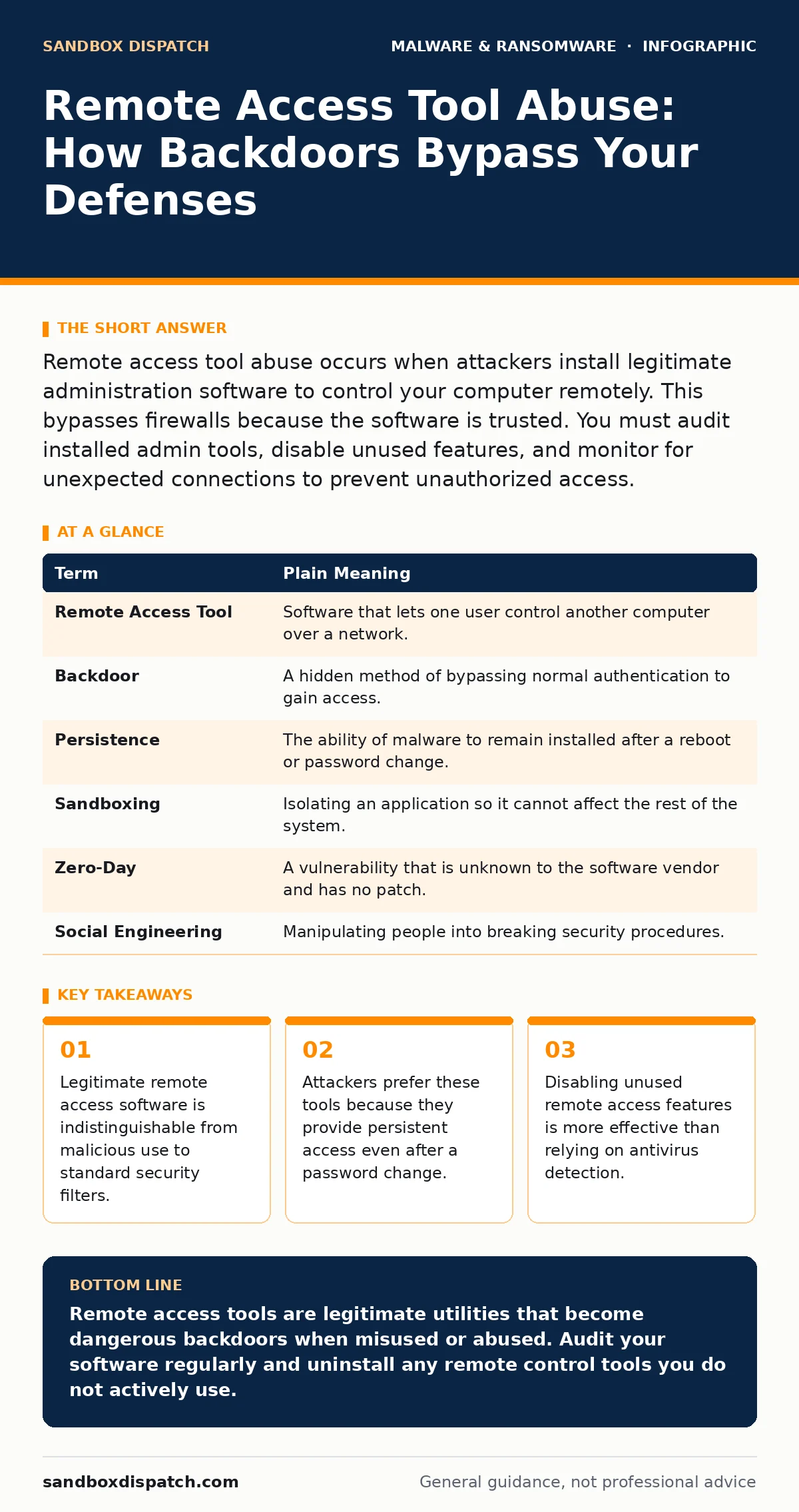
Remote access tool abuse occurs when attackers install legitimate administration software to control your computer remotely. This bypasses firewalls because the software is trusted. You must audit installed admin tools, disable unused features, and monitor for unexpected connections to prevent unauthorized access.
The House Key Analogy
Imagine you hire a contractor to fix your roof. You give them a physical key to your front door so they can enter while you are at work. This is convenient and necessary for the job. Now imagine the contractor makes a copy of that key and keeps it. Years later, they return at midnight. The alarm does not ring because they have a valid key. The lock was never broken. The entry was technically authorized by the hardware, even if it violated your trust.
Remote access tools work exactly like that contractor’s key. They are legitimate software packages designed to let IT staff or support agents control your computer from a distance. When abused, they allow an attacker to sit at your digital desk, see your screen, and move your mouse. The difficulty lies in the fact that the software itself is not malicious. It is a standard utility. This makes it nearly invisible to traditional security measures that look for known bad patterns.
Why Standard Defenses Fail
Most antivirus solutions and firewalls operate on a whitelist and blacklist model. They block known threats and allow known good applications. Remote access tools are on the good list. When an attacker uses one, the traffic looks like a legitimate support session. The encryption is strong, the certificates are valid, and the behavior mimics normal administration.
This creates a blind spot. You might have ransomware decryption tools ready for an emergency, but if an attacker is already inside via a remote tool, they can encrypt your files before you even notice the intrusion. The threat is not the tool itself, but the trust relationship it establishes. The system accepts the connection because the software is signed by a reputable vendor. This is why mobile malware often struggles to exploit these vectors on phones, as mobile operating systems sandbox apps more strictly than desktop environments.
The Hidden Cost of Convenience
The primary trade-off of remote access software is persistence. If an attacker gains access through a vulnerability, you can patch the hole and lock them out. If they install a remote access agent, that agent remains installed. It runs in the background. Even if you change your password, the attacker may still have a way in if the tool supports token-based authentication or if they have access to the administration console.
Consider DLL sideloading as a comparison. That technique tricks a program into loading a malicious library. It is clever but fragile. Remote access abuse is blunt but durable. Once the tool is installed, it acts as a permanent backdoor. The attacker does not need to break in again. They simply log in. This shifts the burden of security from prevention to detection. You must find the unauthorized session before they do damage.
What This Means for You
As an ordinary user, you are not expected to write code or configure firewalls. However, you are expected to manage the software on your machine. If you use fake software updates to trick users into installing malware, the attacker might also try to convince you that you need a specific remote support tool. They might claim your computer is slow or infected and ask you to download a helper program. This is a social engineering attack. The software they provide is often a remote access tool pre-configured to let them control your machine.
Be wary of any request to install remote control software unless you initiated the contact. If you call a support line, they should guide you to use the tool they already provide or a standard built-in feature. Do not download executables from email links or pop-up windows. The moment you install the tool, you hand over the keys to your digital house.
A Mini Glossary
| Term | Plain Meaning |
|---|---|
| Remote Access Tool | Software that lets one user control another computer over a network. |
| Backdoor | A hidden method of bypassing normal authentication to gain access. |
| Persistence | The ability of malware to remain installed after a reboot or password change. |
| Sandboxing | Isolating an application so it cannot affect the rest of the system. |
| Zero-Day | A vulnerability that is unknown to the software vendor and has no patch. |
| Social Engineering | Manipulating people into breaking security procedures. |
Try This Now
- Audit Your Installed Programs: Open your system settings and look for applications with names like "TeamViewer," "AnyDesk," or "LogMeIn." If you do not use them for work or personal support, uninstall them immediately.
- Disable Unused Features: If you must keep a remote tool for occasional use, disable its automatic startup and auto-accept features. Ensure it requires your explicit password or approval for every connection.
- Check for Unknown Sessions: Periodically check your active network connections or the remote tool’s activity log. If you see a session active when you are not using the tool, disconnect it and change your password.
When Detection Is Not Enough
If you suspect your system is compromised, removing malware from a Windows PC is often insufficient. The attacker may have created new user accounts or modified system files. In enterprise environments, extended detection and response (XDR) platforms can correlate events across endpoints to spot the unusual behavior of a remote tool. For individuals, the best defense is prevention. Do not install remote tools unless you absolutely need them.
Imagine you find a key in your pocket that you do not recognize. You do not assume it is yours. You discard it. Treat unauthorized remote access software the same way. If it is not yours, it does not belong on your machine. The convenience of a quick support session is not worth the risk of a permanent backdoor.
Key takeaways
- Legitimate remote access software is indistinguishable from malicious use to standard security filters.
- Attackers prefer these tools because they provide persistent access even after a password change.
- Disabling unused remote access features is more effective than relying on antivirus detection.
Remote access tools are legitimate utilities that become dangerous backdoors when misused or abused. Audit your software regularly and uninstall any remote control tools you do not actively use.
Frequently asked questions
Can antivirus detect remote access tool abuse?
Standard antivirus usually cannot distinguish between a legitimate support session and an attacker using the same tool. It sees the software as safe.
Is it safe to use remote tools for work?
It is safe if you control the installation and disable auto-accept features. Always verify who is connecting and why.
What if I accidentally installed a remote tool?
Uninstall it immediately. Change your passwords and run a full system scan to ensure no other malware was installed alongside it.
Do remote access tools steal data?
They allow anyone with access to see and copy your data. The tool itself does not steal, but it enables theft by giving access.
How this guide was produced: written by the Sandbox Dispatch editorial team with AI assistance, checked against the public references listed below, and reviewed when the facts change. See our editorial policy or report an error.