Vendor Email Compromise: How Attackers Bypass Trust and Steal Funds
Attackers exploit the implicit trust you place in known business partners, using social engineering rather than technical exploits to bypass standard security controls.

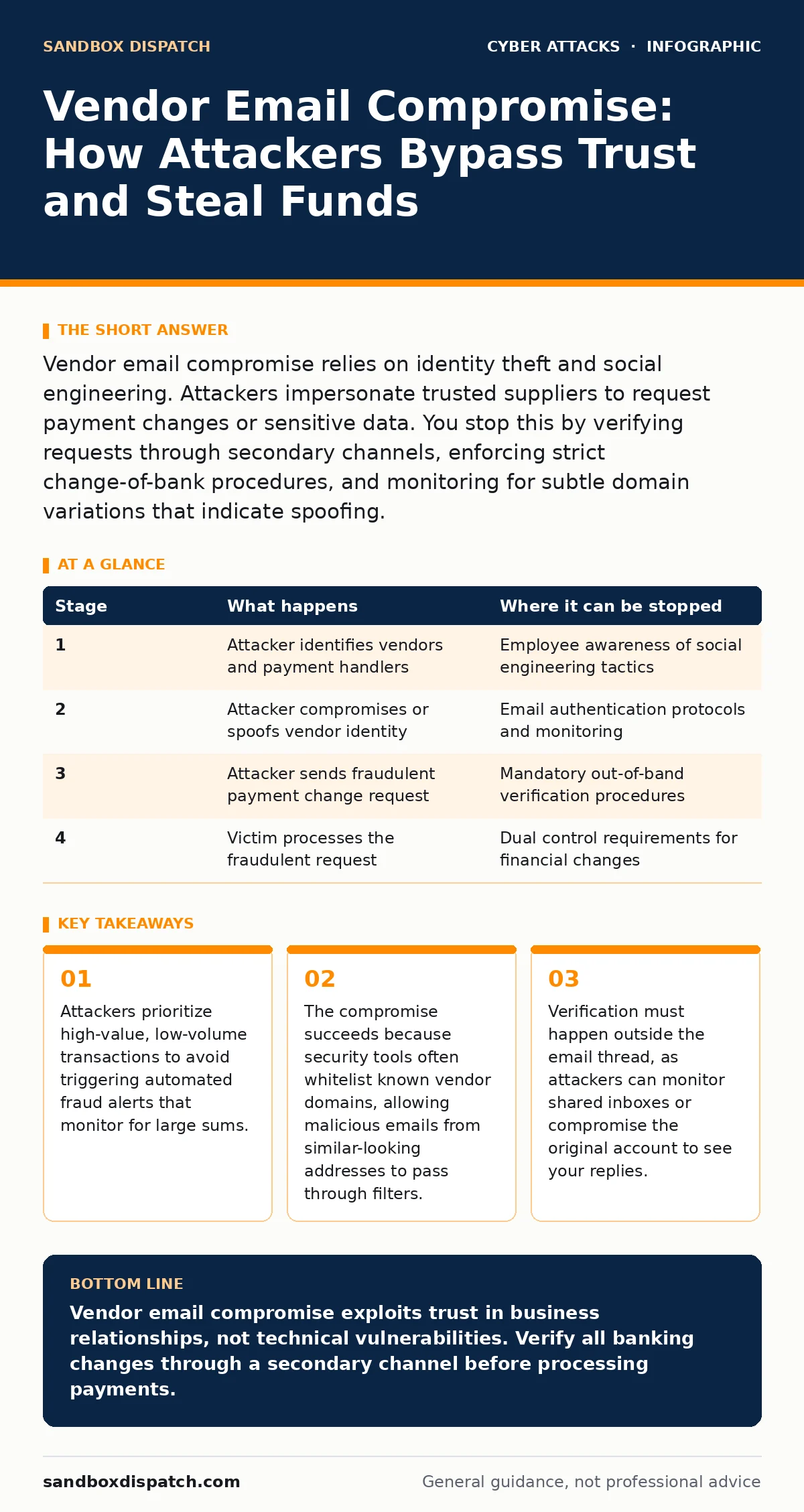
Vendor email compromise relies on identity theft and social engineering. Attackers impersonate trusted suppliers to request payment changes or sensitive data. You stop this by verifying requests through secondary channels, enforcing strict change-of-bank procedures, and monitoring for subtle domain variations that indicate spoofing.
The Anatomy of Trust Exploitation
Vendor email compromise attacks exploit the operational rhythm of your business. You have established relationships with suppliers, and your finance teams process payments based on those relationships. An attacker does not need to break into your network to cause damage. They only need to convince a human employee that a routine request is legitimate. This method bypasses technical defenses by targeting the human element that validates transactions.
The attack relies on two main pillars. First, the attacker gathers intelligence about your vendor relationships. They identify which suppliers send invoices regularly and which employees handle payments. Second, they mimic the communication style of those suppliers. This mimicry is often precise enough to fool even experienced staff who rely on visual cues like logos and email signatures.
Stage 1: Reconnaissance and Target Selection
The attacker begins by mapping your organization’s supply chain. They scan public records, press releases, and social media profiles to identify your key vendors. They look for companies that have recently changed ownership, merged, or updated their banking details. These transitions create noise in communication channels, making it easier for an attacker to insert a fraudulent message.
The attacker also identifies the individuals responsible for accounts payable. They note the names, titles, and email formats of these employees. This information allows them to craft personalized messages that appear to come from a known contact. The goal is to reduce the cognitive load on the victim. A message that looks like it comes from a familiar source requires less scrutiny than one from an unknown sender.
| Stage | What happens | Where it can be stopped |
|---|---|---|
| 1 | Attacker identifies vendors and payment handlers | Employee awareness of social engineering tactics |
| 2 | Attacker compromises or spoofs vendor identity | Email authentication protocols and monitoring |
| 3 | Attacker sends fraudulent payment change request | Mandatory out-of-band verification procedures |
| 4 | Victim processes the fraudulent request | Dual control requirements for financial changes |
Stage 2: Identity Acquisition and Mimicry
Once the target is selected, the attacker acquires the identity of a trusted vendor. There are two primary methods for this. The attacker may compromise the vendor’s actual email account. This often involves using credentials obtained from previous data breaches or through password spraying. The attacker sends the fraudulent request from the legitimate account, making it appear authentic.
Alternatively, the attacker registers a domain that looks similar to the vendor’s domain. This technique is known as domain spoofing. They might add a hyphen, swap similar letters, or use a different top-level domain. For example, they might use a domain that differs by only one character from the real vendor’s domain. This approach exploits the way human eyes scan text quickly, missing subtle discrepancies.
Stage 3: The Fraudulent Request
The attacker sends an email that appears to come from the vendor. The message usually requests a change in banking details. They might claim that the vendor has switched banks, merged with another company, or is undergoing a restructuring. The request often includes urgency, such as a threat of service interruption if the change is not made immediately.
The attacker may also attach a PDF invoice that contains the new banking details. This document looks identical to previous invoices. It includes the vendor’s logo, formatting, and legal disclaimers. The attacker knows that finance teams are trained to review invoices carefully, but they are not always trained to verify the sender’s identity independently. The request relies on the assumption that the email address is correct.
Stage 4: Exploitation and Fund Transfer
The victim employee receives the request and processes it. They update the vendor’s payment information in the accounting system. They may also reply to the email to confirm the change. If the attacker compromised the vendor’s account, they see this reply. This confirms that the attack is working and may allow them to refine their approach for future attempts.
The next invoice arrives with the new banking details. The finance team processes the payment. The funds are transferred to an account controlled by the attacker. The attacker then moves the money through multiple accounts to obscure the trail. This process is known as money mule layering. By the time the real vendor notices the missing payment, the funds are often unrecoverable.
See also: AI-Generated Phishing Emails: How to Spot the Synthetic Trap · Vishing Response: Secure Accounts and Stop Financial Loss
Stage 5: Evasion and Cleanup
After the transfer, the attacker takes steps to avoid detection. They may delete the fraudulent emails from the compromised account. They might change the password of the compromised account to lock out the legitimate user. This delays the discovery of the breach. The attacker may also monitor the victim’s responses to ensure that no one raises an alarm.
The attacker relies on the fact that fraud detection systems often look for large, unusual transactions. By keeping the transaction size within normal parameters for that vendor, the attacker avoids triggering automated alerts. They also rely on the delay between invoicing and payment. This window gives them time to move the funds before the victim realizes the mistake.
Interruption Points and Mitigation Strategies
You can interrupt this attack at several stages. The most effective point is before the payment is processed. Implement a policy that requires out-of-band verification for any change in banking details. This means contacting the vendor through a different channel, such as a phone call to a known number or a separate email address. Do not use the contact information provided in the suspicious email.
You can also strengthen your email security. Use Domain-based Message Authentication, Reporting, and Conformance (DMARC) to prevent spoofing. This protocol verifies that emails claiming to come from a domain are authorized by that domain. While this does not stop account compromise, it stops look-alike domains from appearing to be the real vendor.
The Hidden Cost of Verification
Implementing strict verification processes adds friction to your operations. Finance teams may complain about the extra steps required to process payments. This friction can lead to delays in paying legitimate vendors. You must balance security with operational efficiency. The cost of a single successful compromise often exceeds the time cost of additional verification steps.
You should train employees to recognize the signs of vendor email compromise. These signs include urgent requests, changes in banking details, and slight variations in email addresses. Regular training reinforces these concepts and helps employees stay vigilant. You can also use login alerts to monitor for suspicious activity in vendor accounts, though this requires cooperation from your suppliers.
| Stage | What happens | Where it can be stopped |
|---|---|---|
| 1 | Attacker identifies vendors and payment handlers | Employee awareness of social engineering tactics |
| 2 | Attacker compromises or spoofs vendor identity | Email authentication protocols and monitoring |
| 3 | Attacker sends fraudulent payment change request | Mandatory out-of-band verification procedures |
| 4 | Victim processes the fraudulent request | Dual control requirements for financial changes |
Long-Term Resilience and Process Improvement
Vendor email compromise is an ongoing threat. Attackers constantly adapt their tactics to bypass new defenses. You must regularly review your processes and update your training. Incorporate lessons learned from recent incidents into your security program. Share information with your vendors to help them protect their accounts as well.
You should also consider the use of intrusion prevention systems to block known malicious domains. These systems can help stop emails from look-alike domains before they reach your inbox. However, they cannot stop attacks that use legitimate accounts. Human verification remains the most effective defense against this type of social engineering.
Key takeaways
- Attackers prioritize high-value, low-volume transactions to avoid triggering automated fraud alerts that monitor for large sums.
- The compromise succeeds because security tools often whitelist known vendor domains, allowing malicious emails from similar-looking addresses to pass through filters.
- Verification must happen outside the email thread, as attackers can monitor shared inboxes or compromise the original account to see your replies.
Vendor email compromise exploits trust in business relationships, not technical vulnerabilities. Verify all banking changes through a secondary channel before processing payments.
Frequently asked questions
How do I know if an email is from a legitimate vendor?
Check the sender’s email address carefully for subtle differences. Verify the request by calling the vendor using a known phone number, not one from the email.
Can email filters stop vendor email compromise?
Filters can block spoofed emails, but they cannot detect messages sent from compromised legitimate accounts. Human verification is still required for sensitive requests.
What should I do if I suspect a compromise?
Stop any pending payments immediately. Report the incident to your security team. Contact the vendor through a trusted channel to confirm the status of their account.
Does DMARC prevent vendor email compromise?
DMARC prevents domain spoofing but does not protect against account takeover. It is a useful layer of defense but not a complete solution.
How this guide was produced: written by the Sandbox Dispatch editorial team with AI assistance, checked against the public references listed below, and reviewed when the facts change. See our editorial policy or report an error.