How Cloud Storage Misconfigurations Leak Data Step by Step
Most cloud storage leaks occur because default permissions grant public read access, allowing attackers to discover and download files without exploiting software vulnerabilities.
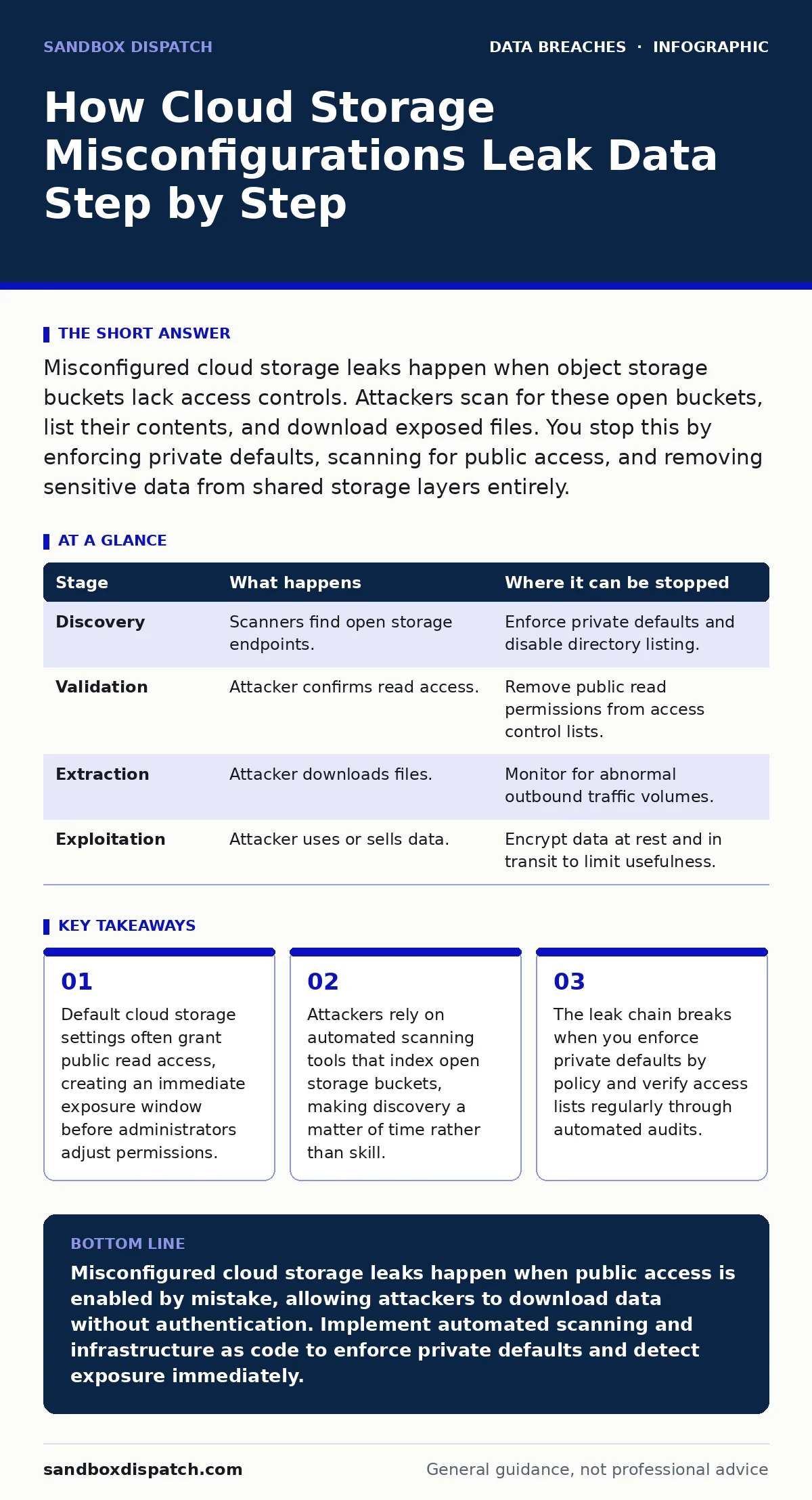
Misconfigured cloud storage leaks happen when object storage buckets lack access controls. Attackers scan for these open buckets, list their contents, and download exposed files. You stop this by enforcing private defaults, scanning for public access, and removing sensitive data from shared storage layers entirely.
The Anatomy of an Open Bucket
Cloud storage services provide object storage for files, images, and backups. These services are designed for flexibility, allowing users to set granular permissions for who can view or modify data. The core vulnerability arises when these permissions are set incorrectly. Most cloud providers default to private access for new containers, but many users or automated scripts create storage with public read permissions to serve static assets.
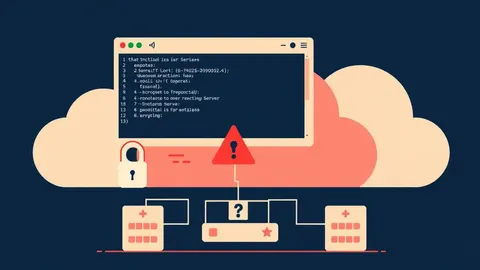
When a container is publicly readable, anyone on the internet can list its contents and download the files inside. This is not a software bug in the cloud provider. It is a configuration error by the user. The attack surface exists because the storage layer trusts the permission settings provided during creation. If those settings allow public access, the storage layer obliges.
Stage 1: Discovery and Enumeration
Attackers do not guess specific file names. They use automated scanners that crawl the internet for known cloud storage URL patterns. These tools check for open directories by sending HTTP requests to common bucket naming conventions. If the server responds with a list of files instead of an access denied error, the scanner logs the endpoint.
This stage relies on the principle of least effort. Attackers target low-hanging fruit. They look for buckets that respond to directory listing requests. You can interrupt this stage by ensuring your storage containers do not allow public listing. Even if a file is publicly accessible, hiding the directory listing makes it harder for attackers to know what files exist. However, this is only a security through obscurity measure. It does not prevent access if the attacker knows the exact file name.
Stage 2: Access Validation
Once a potential target is found, the attacker validates the access level. They attempt to download a sample file or list the root directory. The cloud storage service checks the access control list attached to the container. If the list contains a public read entry, the service returns the data.
This step confirms the misconfiguration. The flaw relies on the storage service following the explicit permission grants. There is no authentication required at this point. The request is treated as coming from an anonymous user with read privileges. You stop this by ensuring no container has public read permissions unless absolutely necessary for serving static content. Even then, you must restrict the specific objects allowed.
Stage 3: Data Extraction
After validation, the attacker begins downloading data. They may use parallel connections to speed up the transfer. The cloud storage service processes these requests as standard read operations. The service does not distinguish between a legitimate user viewing a public image and an attacker exfiltrating a database backup.
The extraction relies on the bandwidth and storage limits of the account. If the attacker downloads large amounts of data, they may incur costs for the owner. This is known as cryptojacking or resource abuse, but the primary goal is often data theft. You interrupt this by monitoring for unusual download volumes. Sudden spikes in outbound traffic from storage services indicate active exfiltration.
Stage 4: Analysis and Exploitation
The attacker now possesses the data. They analyze the files for sensitive information. This could include source code, customer records, or internal documents. The value of the data determines the next steps. They may sell the data on dark web markets, use it for identity theft, or leak it to cause reputational damage.
This stage relies on the content of the data rather than the storage mechanism. The leak is complete once the data leaves your control. You cannot stop this stage after the fact. Prevention must occur in the earlier stages. The only mitigation here is damage control. You must identify what was stolen and notify affected parties if sensitive personal data was exposed.
| Stage | What happens | Where it can be stopped |
|---|---|---|
| Discovery | Scanners find open storage endpoints. | Enforce private defaults and disable directory listing. |
| Validation | Attacker confirms read access. | Remove public read permissions from access control lists. |
| Extraction | Attacker downloads files. | Monitor for abnormal outbound traffic volumes. |
| Exploitation | Attacker uses or sells data. | Encrypt data at rest and in transit to limit usefulness. |
See also: Detect Data Leaks in Logs and Network Traffic
The Hidden Cost of Convenience
Many developers enable public access for quick testing or to share files easily. This convenience creates a persistent risk. The cloud environment is dynamic. New containers are created frequently. Each new container is a potential leak point. Relying on manual checks is insufficient. You need automated enforcement.
Imagine a developer creates a bucket for temporary test data. They forget to set it to private. The bucket remains open for weeks. An attacker finds it and downloads the test data, which includes real customer names. The leak occurs not because of a complex attack, but because of a missed checkbox. This is why data inventory and mapping is critical. You must know what data you have and where it lives to protect it effectively.
Interrupting the Leak Chain
You can stop misconfiguration leaks at three points. First, prevent the misconfiguration. Use infrastructure as code to define storage permissions. This ensures that every new container follows security policies. You cannot accidentally create a public bucket if your code does not allow it. This aligns with user access provisioning best practices, where permissions are granted explicitly and reviewed.
Second, detect the misconfiguration. Run automated scans that check all storage containers for public access. These scans should run continuously, not just during audits. If a public bucket is found, the system should alert you or automatically restrict access. This requires audit logging to track changes and identify who made the configuration error.
Third, limit the impact. Encrypt all data before uploading it to the cloud. If an attacker downloads encrypted files, they cannot read them without the decryption keys. This adds a layer of protection. It does not prevent the leak, but it prevents the exploitation. You should also use data loss prevention tools to scan for sensitive data before it is uploaded to public-facing storage.
The Role of Data Classification
Not all data is equally sensitive. You should classify your data before storing it. Public data can be stored in open buckets. Internal data must be private. Highly sensitive data, such as protected health information, must be encrypted and stored with strict access controls.
Misclassification is a common error. Developers often store sensitive data in the same buckets as public assets. This increases the risk of accidental exposure. You must enforce data classification policies. Tools can scan storage for sensitive patterns and flag violations. This helps you identify where sensitive personal data is stored inappropriately.
Maintaining Long-Term Security
Cloud environments change. Permissions drift over time. A bucket that is private today may become public tomorrow due to a script error or a careless administrator. You must maintain continuous monitoring. Set up alerts for any changes to storage permissions. Review these alerts regularly.
Integrate security checks into your development pipeline. This ensures that security is considered at every stage of deployment. You should also train your team on cloud security best practices. Many leaks occur because developers do not understand the implications of public access. They view it as a feature rather than a risk. Education reduces this human error.
Key takeaways
- Default cloud storage settings often grant public read access, creating an immediate exposure window before administrators adjust permissions.
- Attackers rely on automated scanning tools that index open storage buckets, making discovery a matter of time rather than skill.
- The leak chain breaks when you enforce private defaults by policy and verify access lists regularly through automated audits.
Misconfigured cloud storage leaks happen when public access is enabled by mistake, allowing attackers to download data without authentication. Implement automated scanning and infrastructure as code to enforce private defaults and detect exposure immediately.
Frequently asked questions
How do I know if my cloud storage is publicly accessible?
Use automated scanning tools that check your storage containers for public read permissions and directory listing capabilities. Most cloud providers also offer built-in dashboards that highlight public access.
Can encryption prevent data leaks from misconfigured storage?
Encryption prevents attackers from reading the data if they download it, but it does not stop the download itself. You must also restrict access to prevent exfiltration and resource abuse.
What is the difference between public read and public write access?
Public read allows anyone to view files. Public write allows anyone to upload or modify files. Public write is more dangerous as it can lead to data tampering or malware injection.
How often should I scan for misconfigured storage?
You should scan continuously or at least daily. Cloud environments change frequently, and new misconfigurations can be introduced at any time through automated scripts or manual errors.
How this guide was produced: written by the Sandbox Dispatch editorial team with AI assistance, checked against the public references listed below, and reviewed when the facts change. See our editorial policy or report an error.