Malicious Email Attachments Prevention Checklist for Secure Systems
Most attachment threats bypass traditional antivirus by exploiting legitimate software features rather than relying on known virus signatures.
Block executable files at the gateway, disable automatic macro execution in office suites, and verify sender identity through out-of-band channels. These steps stop the majority of attachment-based attacks before they reach your file system.
Attachment Gateway Controls
Your first line of defense sits at the email perimeter. Configure your mail server to reject or strip specific file types that offer little legitimate value in a professional context. This reduces the surface area for attack significantly.
- Block executable files: Prevent .exe, .scr, and .bat files from entering your inbox to stop direct code execution.
- Strip dual extensions: Remove files named "invoice.pdf.exe" because the operating system often hides the true extension from casual viewers.
- Disable archive auto-extraction: Prevent zip or rar files from unpacking automatically, which hides nested threats from initial scans.
- Restrict script files: Block .js, .vbs, and .ps1 files that can run harmful commands without user interaction in some environments.
- Quarantine unknown MIME types: Send files with unrecognized content types to a sandbox for analysis before delivery to the user.
These rules create a friction point for attackers. They must find new ways to bypass these filters, which buys you time to detect and respond to novel threats. See our guide on email filtering for deeper configuration details.
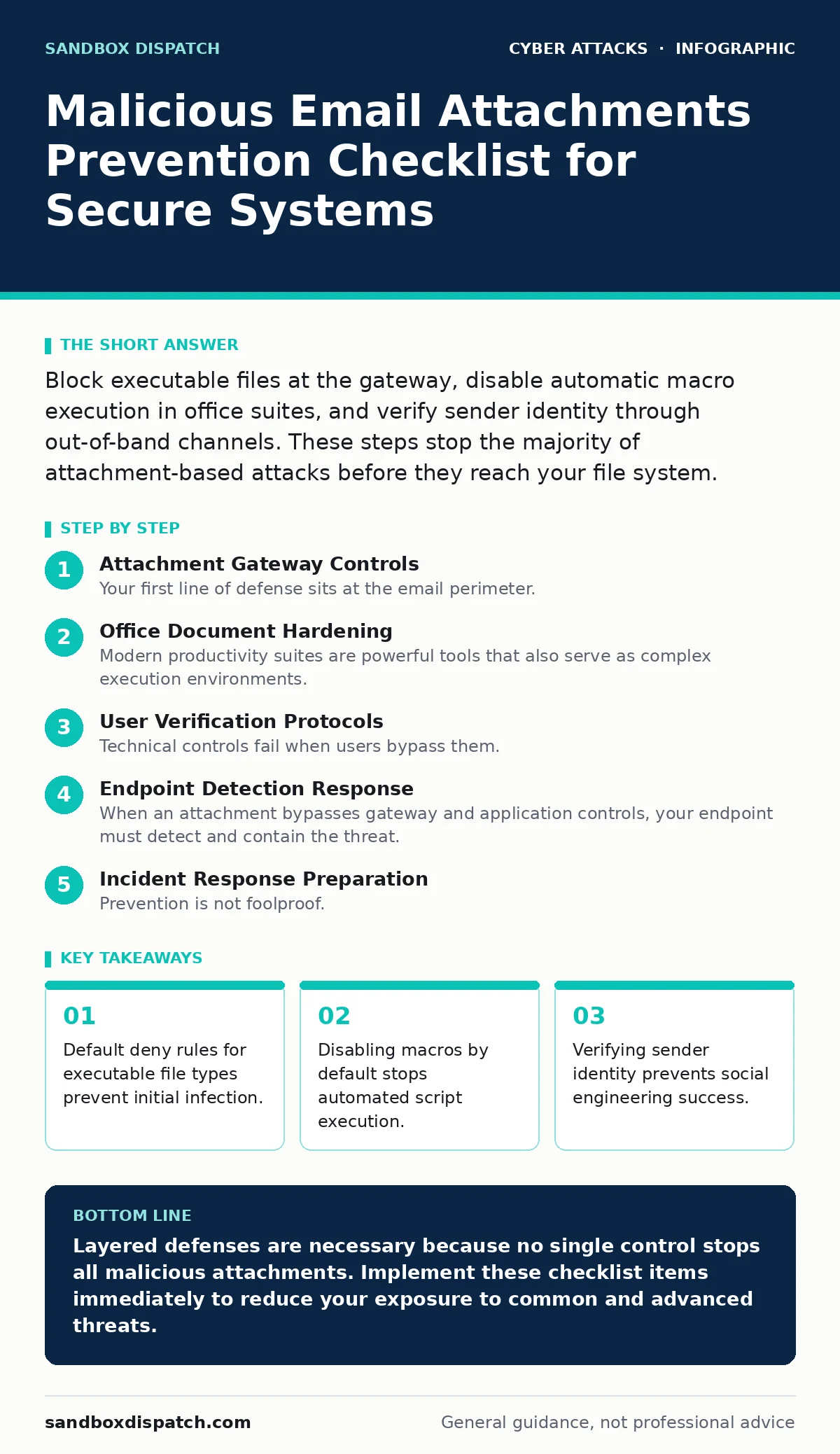
Office Document Hardening
Modern productivity suites are powerful tools that also serve as complex execution environments. Attackers frequently embed malicious code in seemingly benign documents. You must assume any received document is hostile until proven otherwise.
- Disable macros by default: Configure office applications to run without macros, forcing users to explicitly enable them for trusted sources.
- Block remote content: Prevent documents from loading external images or scripts from the internet, which can exfiltrate data or load payloads.
- Use protected view: Open all attachments in a sandboxed environment that restricts interaction with the host system until the user chooses to edit.
- Scan for embedded objects: Detect and remove hidden objects or links that may trigger external requests or download additional malware.
- Limit formula calculation: Disable automatic formula recalculation for external references, which can execute malicious code upon opening.
These settings reduce the risk of drive-by downloads. Users retain functionality for trusted documents but face barriers when opening suspicious files. This approach balances security with usability.
User Verification Protocols
Technical controls fail when users bypass them. Social engineering remains the primary vector for attachment delivery. You need processes to verify the intent and identity of senders before opening files.
- Verify unexpected requests: Contact the sender through a separate channel, such as a phone call, to confirm they sent the attachment.
- Check sender details: Inspect the full email address, not just the display name, for subtle discrepancies or impersonation attempts.
- Look for urgency cues: Be skeptical of emails demanding immediate action, as pressure reduces critical thinking and increases error rates.
- Validate file context: Ensure the attachment matches the expected content and format for the stated purpose of the email.
- Use callback verification: Confirm sensitive requests by calling the known number for the sender, not the number provided in the email.
These steps mitigate the risk of tech support scams and angler phishing. They force attackers to engage in a two-way verification process, which many are unwilling to do. See our guide on callback verification for detailed procedures.
Endpoint Detection Response
When an attachment bypasses gateway and application controls, your endpoint must detect and contain the threat. Endpoint protection solutions monitor system behavior to identify malicious activity.
- Enable behavior monitoring: Track processes for unusual actions, such as a word processor launching a command prompt or downloading files.
- Restrict application whitelisting: Allow only approved applications to run, preventing unauthorized executables from launching even if downloaded.
- Monitor network connections: Alert on outbound traffic from unexpected applications, which may indicate data exfiltration or command-and-control communication.
- Enforce least privilege: Run user accounts with standard permissions, limiting the damage a malicious script can cause to the system.
- Enable memory protection: Detect and block code injection techniques that attempt to run malicious code in the memory of legitimate processes.
These measures provide a safety net for missed detections. They rely on behavioral analysis rather than signature matching, making them effective against new threats. See our guide on endpoint protection for implementation strategies.
See also: Stop Email Spoofing: The Technical Controls That Actually Work · Brute Force Attack Prevention Checklist for Secure Systems
Incident Response Preparation
Prevention is not foolproof. You must prepare for the scenario where a malicious attachment executes successfully. Rapid response limits the scope of the breach.
- Document isolation steps: Create clear instructions for disconnecting an infected device from the network to prevent lateral movement.
- Preserve forensic evidence: Save logs and memory dumps before cleaning the system to aid in root cause analysis.
- Reset credentials: Force password changes for all accounts on the affected device and any accounts with similar privileges.
- Scan connected systems: Check other devices on the same network for signs of infection, as attackers often move laterally.
- Review email headers: Analyze the full header of the malicious email to identify the source and prevent future delivery.
These steps ensure you can contain an incident quickly. Preparation reduces panic and improves the accuracy of your response. See our guide on vendor email compromise for related scenarios.
Key takeaways
- Default deny rules for executable file types prevent initial infection.
- Disabling macros by default stops automated script execution.
- Verifying sender identity prevents social engineering success.
Layered defenses are necessary because no single control stops all malicious attachments. Implement these checklist items immediately to reduce your exposure to common and advanced threats.
Frequently asked questions
Why block zip files if they are common?
Zip files can contain multiple layers of hidden executables or scripts that bypass initial scans. Blocking them reduces the complexity attackers must overcome to deliver a payload.
Is it safe to open PDFs from known senders?
PDFs can contain embedded JavaScript or exploits for the reader application. Even known senders can have compromised accounts, so verify unexpected PDFs through secondary channels.
How do I handle false positives in blocking rules?
Maintain a whitelist for trusted senders and file types. Review blocked items regularly to adjust rules and minimize disruption to legitimate business operations.
What if an attachment is needed for work?
Open the attachment in a isolated virtual machine or sandboxed environment. This prevents any malicious code from affecting your primary system or network.
How this guide was produced: written by the Sandbox Dispatch editorial team with AI assistance, checked against the public references listed below, and reviewed when the facts change. See our editorial policy or report an error.