Patch Prioritization Mistakes That Leave Systems Exposed
Treating all patches equally wastes engineering hours and leaves the most exploitable entry points open to attackers who target known weaknesses.
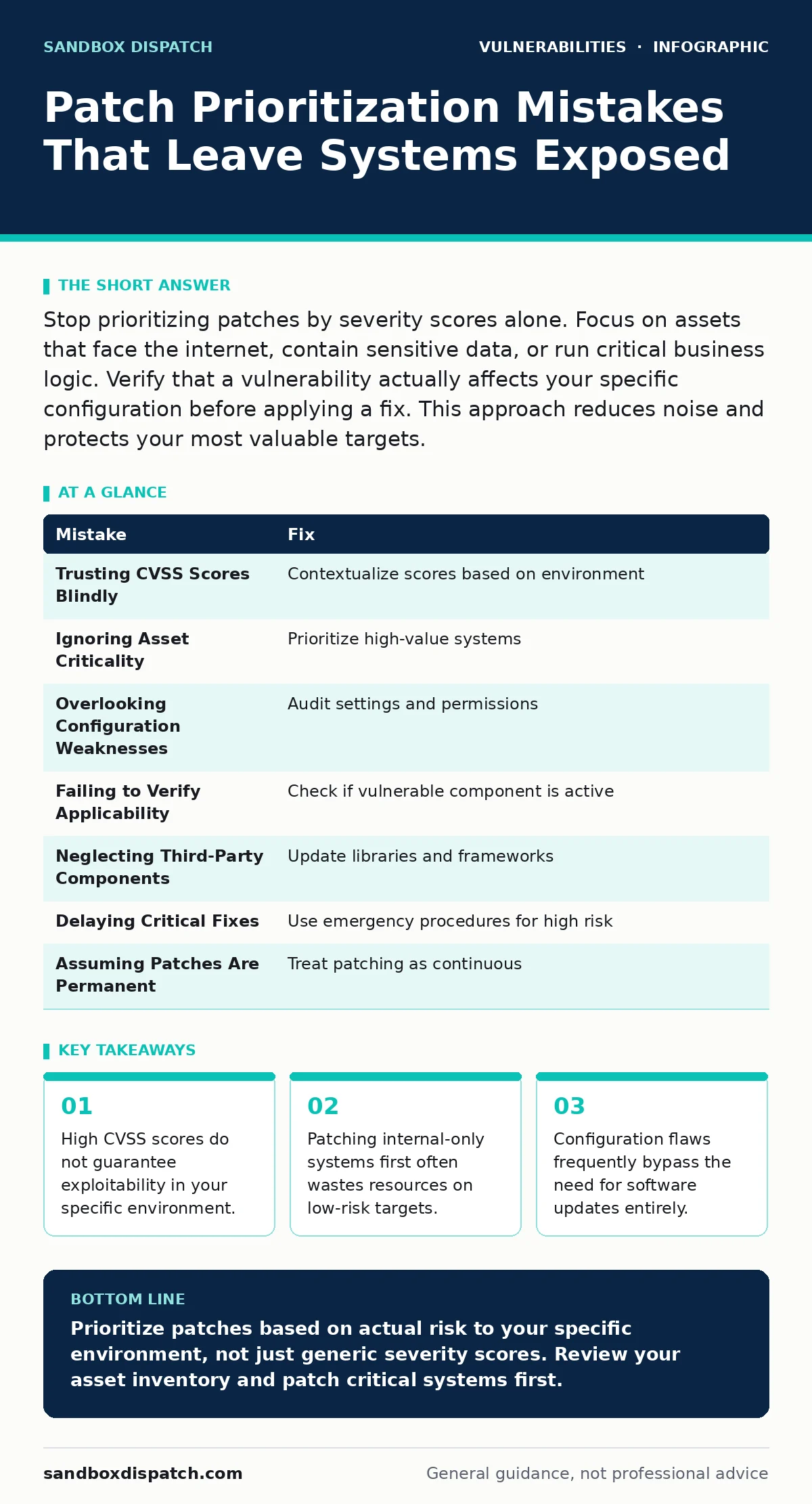
Stop prioritizing patches by severity scores alone. Focus on assets that face the internet, contain sensitive data, or run critical business logic. Verify that a vulnerability actually affects your specific configuration before applying a fix. This approach reduces noise and protects your most valuable targets.
Mistake 1: Trusting CVSS Scores Blindly
Why it hurts: The Common Vulnerability Scoring System provides a standardized way to rate severity, but it assumes a worst-case scenario. A score of 9.8 implies critical danger, yet that danger may require physical access or specific user permissions you do not have. You waste time fixing theoretical risks while ignoring practical ones.
The fix: Contextualize the score. Check if the vulnerability requires user interaction or network access. If your system lacks the necessary entry point, the risk drops significantly. This aligns with principles found in guides on attack vectors in CVSS.
Mistake 2: Ignoring Asset Criticality
Why it hurts: Not all servers hold equal value. Patching a test environment with the same urgency as a production database ignores business impact. You might spend hours fixing a low-value asset while a high-value target remains exposed to known exploits.
The fix: Map vulnerabilities to asset criticality. Prioritize systems that handle payment data, user credentials, or core business logic. Lower priority can be given to isolated development machines. This strategy complements broader patch management workflows.
Mistake 3: Overlooking Configuration Weaknesses
Why it hurts: Many vulnerabilities are not flaws in the code but in how the software is set up. A default password or an open port can allow an attacker to bypass the need for a software patch entirely. Fixing the code does not stop an attack that exploits misconfiguration.
The fix: Audit configurations before applying patches. Ensure services run with least privilege and unnecessary ports are closed. This process is distinct from software updates and falls under configuration hardening.
Mistake 4: Failing to Verify Applicability
Why it hurts: Vendors often release patches for features that your organization does not use. Installing these updates introduces new code paths and potential instability without reducing your actual risk. You increase the attack surface by adding code you do not need.
The fix: Verify that the vulnerable component is present and active in your environment. If you do not use the feature, the vulnerability may not apply. This verification step is a core part of effective vulnerability remediation SLAs.
Mistake 5: Neglecting Third-Party Components
Why it hurts: Your application depends on libraries and frameworks maintained by others. A vulnerability in a third-party component can compromise your entire system, even if your own code is secure. Ignoring these dependencies leaves hidden backdoors open to attackers.
The fix: Maintain an accurate inventory of all third-party components. Monitor security advisories for these libraries and update them regularly. This approach mirrors the scrutiny applied to WordPress theme vulnerabilities in web development.
See also: Zero-Click Exploits: Risks and Protection for Small Businesses · Dependency Scanning Mistakes That Leave Codebases Exposed
Mistake 6: Delaying Critical Fixes for Convenience
Why it hurts: Postponing patches until a scheduled maintenance window creates a window of opportunity. Attackers scan for known vulnerabilities immediately after disclosure. Waiting weeks for a convenient time allows automated tools to exploit the gap.
The fix: Establish emergency procedures for critical vulnerabilities. Be prepared to patch outside of regular windows if the risk is high enough. Balance operational stability with security urgency.
Mistake 7: Assuming Patches Are Permanent
Why it hurts: A patch fixes a specific issue at a specific time. It does not prevent future vulnerabilities or address new attack methods. Treating patching as a one-time fix leads to complacency and leaves systems vulnerable to evolving threats.
The fix: Treat patching as a continuous cycle. Regularly review and update your systems. Integrate patching into your development lifecycle to catch issues early. This mindset supports robust risk-based vulnerability management.
| Mistake | Fix |
|---|---|
| Trusting CVSS Scores Blindly | Contextualize scores based on environment |
| Ignoring Asset Criticality | Prioritize high-value systems |
| Overlooking Configuration Weaknesses | Audit settings and permissions |
| Failing to Verify Applicability | Check if vulnerable component is active |
| Neglecting Third-Party Components | Update libraries and frameworks |
| Delaying Critical Fixes | Use emergency procedures for high risk |
| Assuming Patches Are Permanent | Treat patching as continuous |
Key takeaways
- High CVSS scores do not guarantee exploitability in your specific environment.
- Patching internal-only systems first often wastes resources on low-risk targets.
- Configuration flaws frequently bypass the need for software updates entirely.
Prioritize patches based on actual risk to your specific environment, not just generic severity scores. Review your asset inventory and patch critical systems first.
Frequently asked questions
How do I determine if a vulnerability applies to my system?
Check if the vulnerable component is installed and active. Verify that the required conditions for exploitation, such as network access or user permissions, exist in your environment.
What is the difference between patching and configuration hardening?
Patching updates software to fix code flaws. Configuration hardening adjusts settings to reduce the attack surface, such as disabling unused services or enforcing strong authentication.
Should I patch all systems at the same time?
No. Prioritize based on asset criticality and exposure. Systems facing the internet or holding sensitive data should be patched first. Internal or isolated systems can wait.
How often should I review my patch prioritization strategy?
Review it regularly, especially after significant changes to your infrastructure or when new high-severity vulnerabilities are disclosed. Keep your asset inventory current.
How this guide was produced: written by the Sandbox Dispatch editorial team with AI assistance, checked against the public references listed below, and reviewed when the facts change. See our editorial policy or report an error.