How Malware Persistence Mechanisms Work and Where They Hide
Persistence relies on the operating system’s startup routines, turning legitimate system features into reliable backdoors that survive reboots and user logoffs.
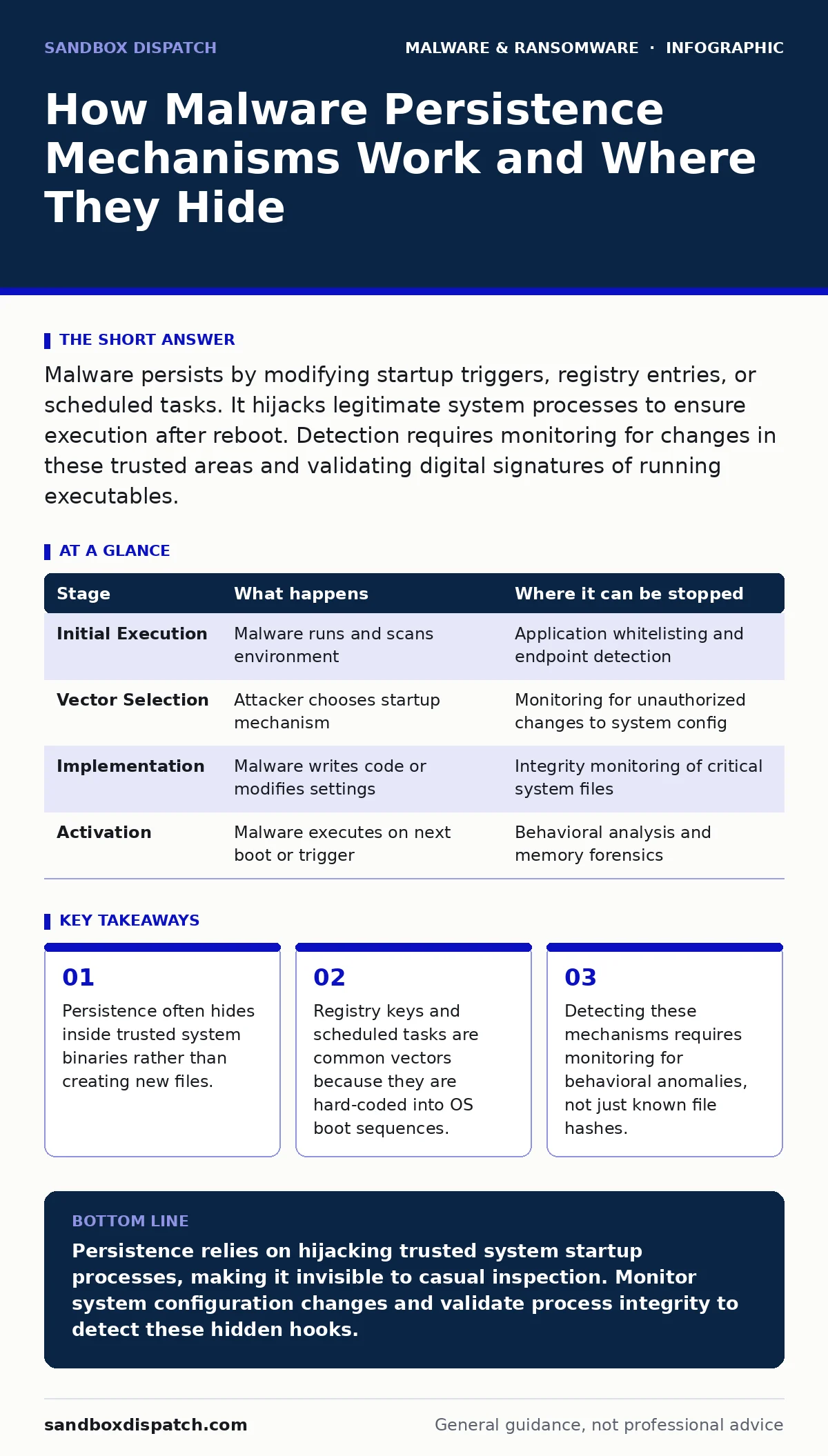
Malware persists by modifying startup triggers, registry entries, or scheduled tasks. It hijacks legitimate system processes to ensure execution after reboot. Detection requires monitoring for changes in these trusted areas and validating digital signatures of running executables.
The Anatomy of a Persistent Threat
Malware persistence is the ability of malicious code to survive system restarts, user logoffs, and security scans. Without persistence, an attacker must re-infect the system every time it reboots, which is inefficient and noisy. Persistence turns a transient infection into a long-term foothold.
The core mechanism relies on hijacking the operating system’s initialization sequence. When you boot a computer, the OS loads drivers, services, and applications in a specific order. Malware inserts itself into this chain. It does not need to replace system files. It only needs to append its instructions to existing triggers.
Stage 1: Initial Access and Reconnaissance
The process begins with execution. The malware must run at least once to establish persistence. This often happens through social engineering, exploiting a vulnerability, or via supply chain compromise. See our guide on fake software updates for how attackers disguise payloads as legitimate patches.
Once running, the malware scans the environment. It identifies the operating system version, installed security products, and available privileges. It looks for writable directories and existing startup mechanisms. It avoids high-visibility areas if possible. It seeks paths that are monitored less frequently by standard antivirus heuristics.
This stage is brief. If the malware is detected here, persistence fails. The goal is to move quickly from execution to installation. It writes its payload to disk or embeds itself in memory. It prepares the hooks that will trigger its next run.
Stage 2: Selecting the Persistence Vector
The attacker chooses a mechanism based on privilege level and detection risk. Common vectors include registry run keys, scheduled tasks, and service installations. Each has trade-offs. Registry keys are simple but heavily monitored. Services offer higher privileges but require administrative rights.
Some malware uses DLL sideloading to hijack legitimate applications. It places a malicious dynamic link library in a directory where a trusted app looks for dependencies. When the app starts, it loads the malicious code. This method is stealthy because the parent process is signed and trusted.
Other techniques involve modifying boot sectors or firmware. These are harder to detect and remove but require deep system access. They survive disk reformatting if the firmware is not updated. This level of persistence is rare because it is complex to implement.
| Stage | What happens | Where it can be stopped |
|---|---|---|
| Initial Execution | Malware runs and scans environment | Application whitelisting and endpoint detection |
| Vector Selection | Attacker chooses startup mechanism | Monitoring for unauthorized changes to system config |
| Implementation | Malware writes code or modifies settings | Integrity monitoring of critical system files |
| Activation | Malware executes on next boot or trigger | Behavioral analysis and memory forensics |
Stage 3: Implementing the Hook
The malware modifies the selected vector. If using the registry, it adds a new entry to a run key. The entry points to the malicious executable. If using scheduled tasks, it creates a new task with a misleading name. The task triggers at logon or at a specific time.
The implementation must be resilient. The malware may encode its payload to avoid signature detection. It may split its code across multiple files. It may use obfuscation to hide its true purpose. The goal is to look like a normal system component.
This stage is critical for detection. Standard antivirus tools often scan for known file hashes. If the malware is new or polymorphic, it may slip through. However, the act of modifying system configuration is suspicious. Extended detection and response (XDR) systems can correlate these changes with other suspicious activity.
Stage 4: Validation and Survival
After implementation, the malware tests its hook. It may trigger the persistence mechanism immediately to ensure it works. If the test fails, it may try a different vector. If it succeeds, it lies dormant until the next trigger.
The malware must also defend itself. It may disable security services or block access to its files. It may use rootkit techniques to hide from the operating system. These actions are risky and can alert security teams.
See also: Clipboard Hijackers: How They Steal Crypto and How to Stop Them · Detect Scheduled Task Abuse: Logs, Signals and Blind Spots
Reading the Signs
Detecting persistence requires looking beyond file names. You must monitor for changes in system configuration. Registry editors, task schedulers, and service managers are prime targets. Log every modification to these areas.
Look for anomalies in process trees. A web browser should not spawn a system update process. A document editor should not launch a command shell. These deviations indicate hijacking. Use memory forensics to inspect running processes for injected code.
Applying Defenses
Prevention starts with least privilege. Users should not have administrative rights. This blocks many persistence mechanisms that require elevated permissions. Application whitelisting ensures only approved software runs.
Regular audits of startup items are necessary. Compare current configurations against a known good baseline. Any deviation must be investigated. Automate this process to reduce human error.
Clipboard hijackers and browser isolation are related threats that often accompany persistence. See our guide on script blocking to prevent the initial execution that enables persistence. Mobile malware also uses persistence techniques, often leveraging accessibility services.
The Hidden Cost of Stealth
Stealth comes at a cost. Complex persistence mechanisms are harder to maintain. They may break after system updates. They may conflict with other software. This fragility is a weakness attackers must manage.
You can exploit this fragility. Regular system updates can disrupt poorly implemented persistence. Reinstalling the operating system is the ultimate reset. It removes most file-based persistence. Firmware-based persistence is the exception.
Key takeaways
- Persistence often hides inside trusted system binaries rather than creating new files.
- Registry keys and scheduled tasks are common vectors because they are hard-coded into OS boot sequences.
- Detecting these mechanisms requires monitoring for behavioral anomalies, not just known file hashes.
Persistence relies on hijacking trusted system startup processes, making it invisible to casual inspection. Monitor system configuration changes and validate process integrity to detect these hidden hooks.
Frequently asked questions
How do I check for malware persistence on Windows?
Review the Registry Run keys, Scheduled Tasks, and installed Services for unfamiliar entries. Compare these against a known baseline of your system.
Can antivirus software detect all persistence mechanisms?
No. Antivirus relies on known signatures. New or obfuscated persistence mechanisms may evade detection. Behavioral monitoring is required for unknown threats.
Does deleting the malicious file remove persistence?
No. The trigger mechanism, such as a registry key or scheduled task, remains. You must remove both the payload and the trigger.
How often should I audit startup items?
Continuously. Use automated tools to monitor for changes in real-time. Manual audits are too slow to catch active attacks.
How this guide was produced: written by the Sandbox Dispatch editorial team with AI assistance, checked against the public references listed below, and reviewed when the facts change. See our editorial policy or report an error.